
 55 Park Road,


Transforming Enterprise Data into Actionable Intelligence: Leveraging Microsoft Power BI
For emerging and large corporations, data is no longer just a byproduct of operations; it is the core asset driving strategic growth. However, the gap between warehousing raw data and extracting actionable, in-depth business insights remains a critical challenge. Microsoft Power BI has evolved from a simple visualization tool into a comprehensive enterprise analytics platform.
To truly leverage Power BI, organizations must move beyond basic dashboarding and embrace advanced data modeling, AI integrations, and rigorous security architectures. This article explores the technical strategies required to deploy Power BI effectively at an enterprise scale.
1. Architecting the Data Foundation
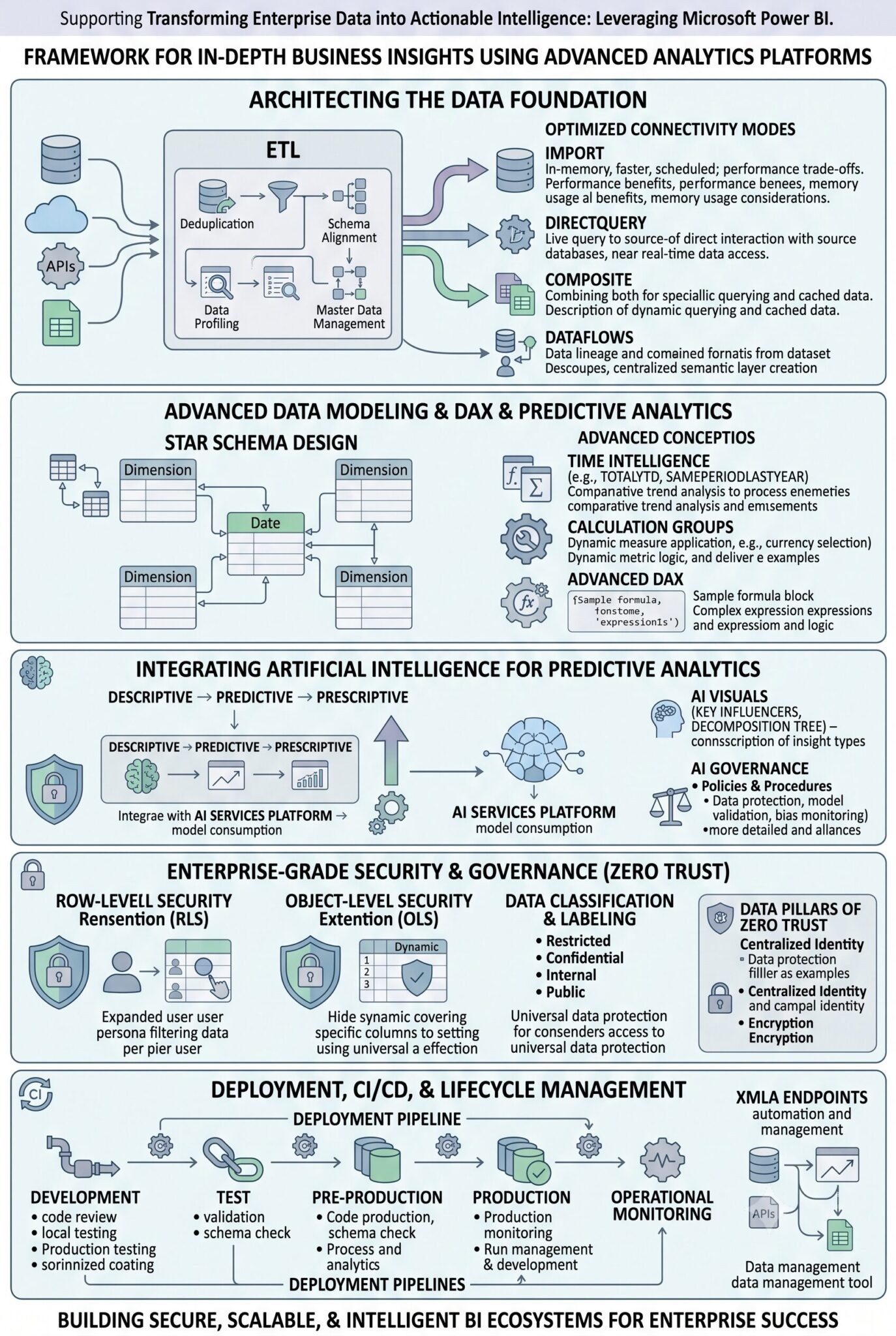
The foundation of in-depth insights relies on how data is ingested, transformed, and stored. Power BI offers multiple connectivity modes, each serving specific enterprise requirements. Selecting the right architecture dictates the performance and scalability of your reporting environment.
Optimizing Connectivity Modes
For massive datasets, the debate often centers on whether to import data or query it directly from the source.
| Connectivity Mode | Mechanism | Best Use Case | Enterprise Consideration |
| Import Mode | Caches data directly into the Power BI VertiPaq engine (in-memory). | Highly aggregated dashboards, complex DAX calculations, fast UI response. | Requires scheduled refreshes; dataset size is limited by capacity constraints. |
| DirectQuery | Queries the underlying data source (e.g., Azure SQL, Snowflake) in real-time. | Near real-time analytics, massive datasets exceeding memory limits. | Performance is heavily dependent on the underlying database optimization. |
| Composite Models | Combines Import and DirectQuery in a single semantic model. | Enterprise scenarios requiring historical data (Import) combined with real-time operational data (DirectQuery). | High complexity in data modeling; requires careful management of data relationships. |
Strategic Recommendation: Leverage Dataflows to decouple data transformation (Power Query) from the dataset. This allows multiple reports and datasets to connect to a single, centralized, and certified source of truth, establishing a highly efficient semantic layer.
2. Advanced Data Modeling and DAX
The true analytical power of Power BI resides in Data Analysis Expressions (DAX) and the underlying tabular model.
-
Star Schema Design: Transitioning away from flat, wide tables to a rigorous Star Schema (Fact and Dimension tables) is non-negotiable for enterprise deployments. This optimizes the VertiPaq engine’s compression algorithms and ensures accurate DAX evaluations.
-
Time Intelligence: Business insights rely heavily on comparative metrics (Year-over-Year, Quarter-to-Date). Implementing standardized, central Date tables enables complex time-intelligence DAX functions, allowing executives to seamlessly analyze trends across customized fiscal calendars.
-
Calculation Groups: To prevent DAX code bloat, implement calculation groups. Instead of writing separate measures for “Sales YTD”, “Profit YTD”, and “Cost YTD”, a single calculation group can apply the YTD logic dynamically across any base metric, streamlining model maintenance.
3. Integrating Artificial Intelligence for Predictive Analytics
Modern corporate environments are rapidly moving from descriptive analytics (what happened) to predictive and prescriptive analytics (what will happen and what should we do). Power BI facilitates this through seamless AI integrations.
-
Azure Machine Learning Integration: Power BI can directly consume machine learning models deployed in Azure. This allows analysts to run predictive models (e.g., customer churn probability, inventory forecasting) directly against incoming data streams within the Power Query editor.
-
AI Visuals: Native visuals such as the Key Influencers and Decomposition Tree utilize machine learning behind the scenes to automatically identify the hidden factors driving a specific metric, stripping away manual exploration time.
-
AI Governance: As AI tools like Copilot become embedded within the Power BI ecosystem to auto-generate DAX and narrative summaries, organizations must establish clear AI governance policies. Ensuring that AI features only interact with certified, sanitized datasets is crucial to maintaining the integrity of corporate insights.
4. Enterprise-Grade Security and Zero Trust Architecture
Deploying analytics at scale requires uncompromising network security and data governance. Power BI must be integrated into the organization’s broader cybersecurity strategy, treating every data access request with a “never trust, always verify” mindset.
Implementing Granular Access Controls
To align with a Zero Trust architecture, data access within Power BI must be heavily restricted and context-aware.
-
Row-Level Security (RLS): RLS dynamically filters data at the row level based on the Azure Active Directory (Entra ID) context of the user viewing the report. A regional manager viewing a global sales report will only see data relevant to their specific region, utilizing a single, centralized report rather than maintaining dozens of localized copies.
-
Object-Level Security (OLS): Taking security a step further, OLS obscures specific tables or columns (and any measures referencing them) from unauthorized users. This is vital for protecting highly sensitive information, such as employee salaries or proprietary cost-of-goods metrics, within a broadly shared dataset.
-
Microsoft Purview Integration: By connecting Power BI with Microsoft Purview, security teams can apply universal sensitivity labels (e.g., “Highly Confidential”, “Internal Only”). These labels travel with the data; if a user exports a highly confidential Power BI matrix to Excel, the Excel file automatically inherits the encryption and access restrictions of the original dataset.
5. Deployment, CI/CD, and Lifecycle Management
Treating BI assets with the same rigor as software development is essential for managed IT operations and internal IT departments.
-
Deployment Pipelines: Power BI’s native deployment pipelines facilitate a structured flow of content from Development $rightarrow$ Test $rightarrow$ Production workspaces. This ensures that new DAX measures or data transformations are thoroughly validated before they impact executive dashboards.
-
XMLA Endpoints: Enabling read/write XMLA endpoints allows data engineers to connect to Power BI datasets using third-party enterprise tools like Tabular Editor or ALM Toolkit. This enables programmatic management, version control via Git, and integration into automated CI/CD workflows.
The Path Forward
Leveraging Microsoft Power BI for in-depth insights requires looking past the visualizations to focus on the underlying architecture, security posture, and data modeling. By treating Power BI as a secure, scalable, and AI-enabled semantic layer, enterprise IT teams can empower decision-makers with a trusted, high-performance intelligence platform that drives tangible business value.


