
 55 Park Road,



Penny saved, pound foolish: the $200 router that costs you thousands
Most small and medium businesses don’t plan their Wi-Fi. They inherit it. Someone buys a router from the local electronics store, plugs it in near the NBN box, and adds a range extender when the back office complains. It works, mostly, and it was cheap.
The trouble is that Wi-Fi is no longer a convenience. It carries your Teams calls, your VoIP phones, your EFTPOS terminals, your cloud apps and your guests. When it falters, your business falters with it, a few minutes at a time, every day.
That’s the penny saved, pound foolish trap. The cost of a cheap, unplanned network doesn’t show up on the invoice. It shows up in dropped calls, frustrated staff and support tickets that never quite get solved. A proper Wi-Fi survey is how you avoid it.
What goes wrong without a Wi-Fi site survey
Wi-Fi is radio, and radio doesn’t care what the box says on the front. Walls, glass, people and the business next door all change how a signal behaves. Without a survey, you’re guessing where access points should go and hoping the building cooperates. Here’s what we typically find when we’re called in to fix an unplanned network:
- Dead zones and weak spots. Concrete walls, lift shafts, foil-backed insulation, mirrors and even fish tanks absorb or reflect signal. The meeting room at the end of the hall gets one bar, and that’s where your client presentations happen.
- Interference from the neighbours. In shared office buildings and strip shops, dozens of nearby networks compete for the same channels. A router left on “auto” often picks a crowded channel and stays there.
- Too many devices on too few access points. A single consumer router might cope with a household. Twenty staff, each with a laptop and phone, plus printers, cameras and guests, can overwhelm it.
- Extenders that make things worse. Many range extenders can halve your throughput and create a second network that devices cling to long after they should have moved on.
- Calls dropping as people move. Without proper roaming design, a phone or laptop holds onto a distant access point instead of handing over to a closer one. The result is the classic Teams freeze as someone walks to the kitchen.
- Too much signal, not too little. Over-powered access points shout over each other. More hardware without a plan can reduce performance, not improve it.
The cheap option rarely stays cheap. The real costs are spread thin across every day, so they’re easy to miss:
- Lost time. A few minutes of reconnecting, waiting for files and restarting calls each day adds up quickly across a team.
- Lost credibility. A frozen video call with a client, or an EFTPOS terminal that drops out at the counter, says something about your business that you didn’t intend.
- Support tickets that go in circles. “The internet is slow” is one of the hardest problems to pin down when nobody knows how the network was meant to work. Your IT provider spends billable hours chasing symptoms instead of fixing the cause.
- Security gaps. Ad-hoc networks often have staff, guests, cameras and smart devices all on one flat network, with default passwords and out-of-date firmware. That’s an easy path for an attacker, and the kind of gap a network security assessment will find.
- Buying twice. The most common pattern we see: a business buys more extenders, then a mesh kit, then finally a business-grade system. They pay for the right solution in the end, plus everything that came before it.
What a Wi-Fi site survey involves
A Wi-Fi survey replaces guesswork with measurement. It tells you how many access points you need, exactly where they go, and how they should be configured. A good survey has four stages:
- Requirements. We start with how you work, not with hardware. How many people and devices? Where do calls happen? Do you run VoIP handsets, EFTPOS, cameras or a guest network? Are there areas that need more capacity, like a boardroom or warehouse floor?
- Predictive design. Using your floor plan, we model the building in specialist survey software, including wall materials and ceiling heights. This produces a heat map showing coverage and capacity before a single cable is run.
- On-site survey. We walk the site with measurement tools to capture real signal strength, interference and neighbouring networks. Every building has surprises that a floor plan won’t show.
- Validation after install. Once the access points are in, we survey again to confirm the network performs as designed. You get a report showing coverage across the site, which becomes the baseline for future troubleshooting.
The outcome is a network designed for your building and your business, with the right number of access points in the right places, sensible channel and power settings, separate networks for staff, guests and devices, and smooth roaming between rooms.
What a Wi-Fi heat map shows you
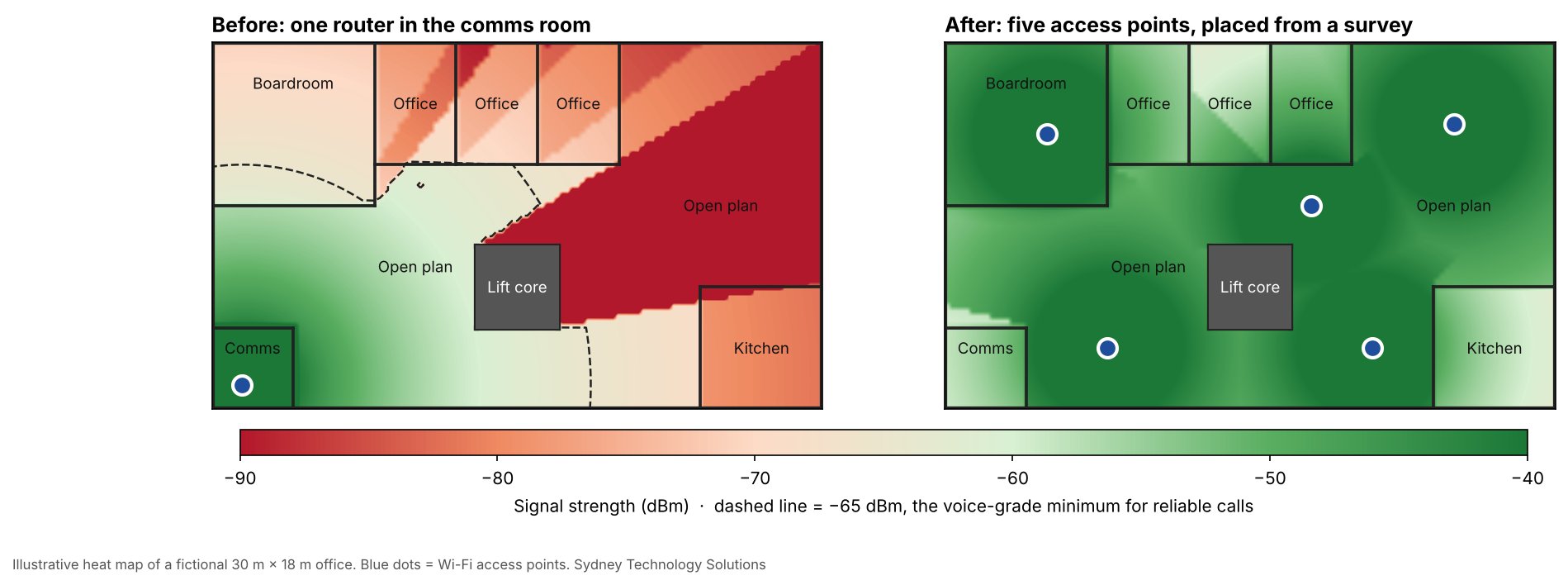
A Wi-Fi heat map is a colour-coded floor plan of signal strength. Green means strong, reliable signal. Red means weak or no signal. The dashed line marks -65 dBm, the voice-grade level we design to for reliable voice and video calls. Areas that only need data, like warehouse floors, can work at around -75 dBm.
The example below is a fictional 30 m × 18 m office. On the left, a single router sits in the comms room. The lift core and internal walls block the signal, so half the open-plan area, the private offices and the kitchen fall below call quality. On the right, five access points placed from a survey give strong coverage across the whole floor.
Is a Wi-Fi survey worth the cost? Do the maths
Ten minutes a day of Wi-Fi frustration per person costs a 15-person office around $34,500 a year. For a 50-person business, it’s around $115,000. That’s an illustrative example, but the assumptions are conservative:
| Assumption | Value |
|---|---|
| Staff | 15 |
| Time lost per person per day | 10 minutes |
| Average loaded cost per staff hour | $60 |
| Working days per year | 230 |
| Productivity lost per year | $34,500 |
That figure doesn’t include the dropped client calls, the extenders bought and binned, or the IT hours spent chasing intermittent faults. A professional survey and a properly designed network typically cost a fraction of one year’s losses, and the network will serve you for years.
Saving a few dollars on the survey can cost you many times that amount. That’s penny saved, pound foolish.
Is your small business Wi-Fi holding you back? A quick checklist
If you answer yes to two or more of these, your network deserves a proper look:
- Staff complain about slow or dropping Wi-Fi in certain rooms
- Teams, Zoom or VoIP calls freeze when people move around
- You use range extenders or a consumer mesh kit to fill gaps
- Staff, guests and devices all share the same network and password
- Nobody can say when the router firmware was last updated
- You’re moving office, expanding, or adding more people or devices
- Your current setup was never designed, it just grew
Wi-Fi survey FAQs
How much does a Wi-Fi survey cost?
It depends on the size of the site, the number of floors and whether you need an on-site survey or a predictive design from your floor plan. STS provides a fixed quote once we’ve seen your floor plan and understood how you use the space. Compared with the cost of poor Wi-Fi, it usually pays for itself quickly.
How long does a Wi-Fi site survey take?
For a typical small office, the on-site walk-through takes a few hours. Predictive design and the written report follow within days. A validation survey after installation takes a few more hours.
Will a survey disrupt my staff?
No. The engineer walks the site with a laptop and measurement equipment. Staff keep working, and we can schedule the visit outside business hours if you prefer.
Can’t I just buy a mesh Wi-Fi system?
Consumer mesh kits are built for homes. Most businesses need cabled access points, central management, separate staff and guest networks, and smooth roaming for calls. A survey tells you what you need, so you don’t buy kit twice.
I’m moving office. When should I get a survey?
Before the fit-out, ideally. Planning access point locations early means data cabling goes in once, in the right places, before ceilings and walls are closed up. Our data cabling team can then run the cables to the right spots first time.
Do I need Wi-Fi 6E or Wi-Fi 7?
Not always. Newer standards add faster speeds and the 6 GHz band, which the ACMA opened to Wi-Fi in Australia in 2022, but 6 GHz signals travel a shorter distance and are blocked more easily by walls. That makes access point placement even more important, which is exactly what a survey answers.
Business Wi-Fi surveys in Sydney: how STS can help
Sydney Technology Solutions designs business Wi-Fi for small and medium businesses across Sydney the right way: survey first, then design, install and validate. Whether you’re fitting out a new office or fixing one that’s never worked properly, we’ll show you on a heat map exactly where the problems are and what it takes to fix them. No guesswork, and no buying twice.
Ready to find out what your Wi-Fi is really costing you? Call us on (02) 8212 4722 or book a complimentary consultation.


